

Math object. No imports needed - just call
Math.calcAngle(...) like you’d call Math.sin(...).
All angles are in radians unless stated otherwise. Convert with
Math.toRadians(deg) and Math.toDegrees(rad).Overview
Vectors & angles
Convert between directions and Euler angles, calculate aim angles.
Screen projection
Project 3D world positions onto your 2D screen.
Angle normalization
Clamp, normalize, and compare angles safely.
Interpolation
Lerp, smooth step, remap - smooth everything.
Vectors & angles
These three functions convert between world positions, direction vectors, and Euler angles (QAngle). They form the core of any aim or movement calculation.calcAngle
src directly at dst.
This is the function you reach for first in any aim-related code.
angleVectors
forward. “What’s to my right?” → right.
vectorAngles
angleVectors - converts a direction vector back to an
Euler angle.
Screen projection
These functions bridge 3D world space and 2D screen space. You need them every time you draw something at a game object’s position.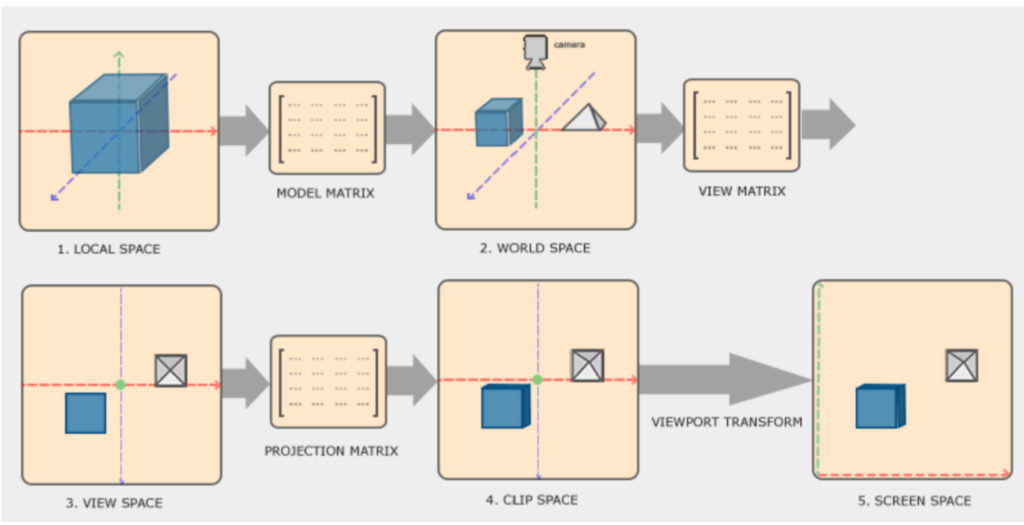
A 3D world position projected to pixel coordinates on the screen.
worldToScreen
Full walkthrough: Drawing on screen builds
a complete ESP overlay step by step using
worldToScreen.screenTransform
worldToScreen but returns normalized device coordinates (-1
to 1) instead of pixel values. For custom projection math only.
Angle normalization
Engine angles can overflow or land outside expected ranges after math operations. These functions clean them up.clampAngles
normalizeAngles
[-180, 180] using modular arithmetic
and returns the same object.
Unlike clampAngles, 270° becomes −90°, not 180°.
calculateFOV
Returns
number - 0 = perfectly aligned, 180 = opposite direction.
Interpolation & mapping
Five functions for smoothing, clamping, and remapping values. The building blocks for animations, health bars, opacity fades, and anything that transitions between two states.clamp
[min, max]. Below min → min. Above max → max.
lerp
t=0 → a, t=1 → b, t=0.5 → midpoint.
Not clamped - t outside [0, 1] extrapolates past the endpoints.
inverseLerp
lerp: given a value in the [a, b] range, returns where
it sits as a 0–1 factor.
Returns
0 if a === b (avoids division by zero). Keep this in mind
when a and b come from game data that might collapse to a single value.smoothStep
lerp but with easing - starts slow, speeds up, ends slow.
Internally clamps t to [0, 1], then applies 3t² − 2t³.
- Health bar fill
- Opacity fade
- Position ease
remapVal
- Health → color
- Distance → opacity
- Health → bar width
- FOV → circle size
If
srcMin === srcMax, the result is a division by zero. Guard against
this when source bounds come from game data (e.g. maxHealth could be 0
for a newly spawned entity).